
How to set it up
Setting up the Gruff smart socket is simple and fast. Follow the steps below and start saving in less than 5 minutes.
4 simple steps
Download the Gruff app
Download the Gruff Technology app from Google Play or Apple App Store. The app is free and requires no subscription. Search for the keyword GRUFF. After installation, grant the app access to location data.
Connect socket to Wi-Fi
Plug the smart socket into a wall outlet and follow the in-app instructions to connect it to your Wi-Fi network. The socket operates on a 2.4 GHz Wi-Fi network.
NB! When setting up the socket, turn off mobile data and enable location settings. When purchased, the socket is turned on — to control the device based on prices, select “Automatic” mode in the app.
Set price limits
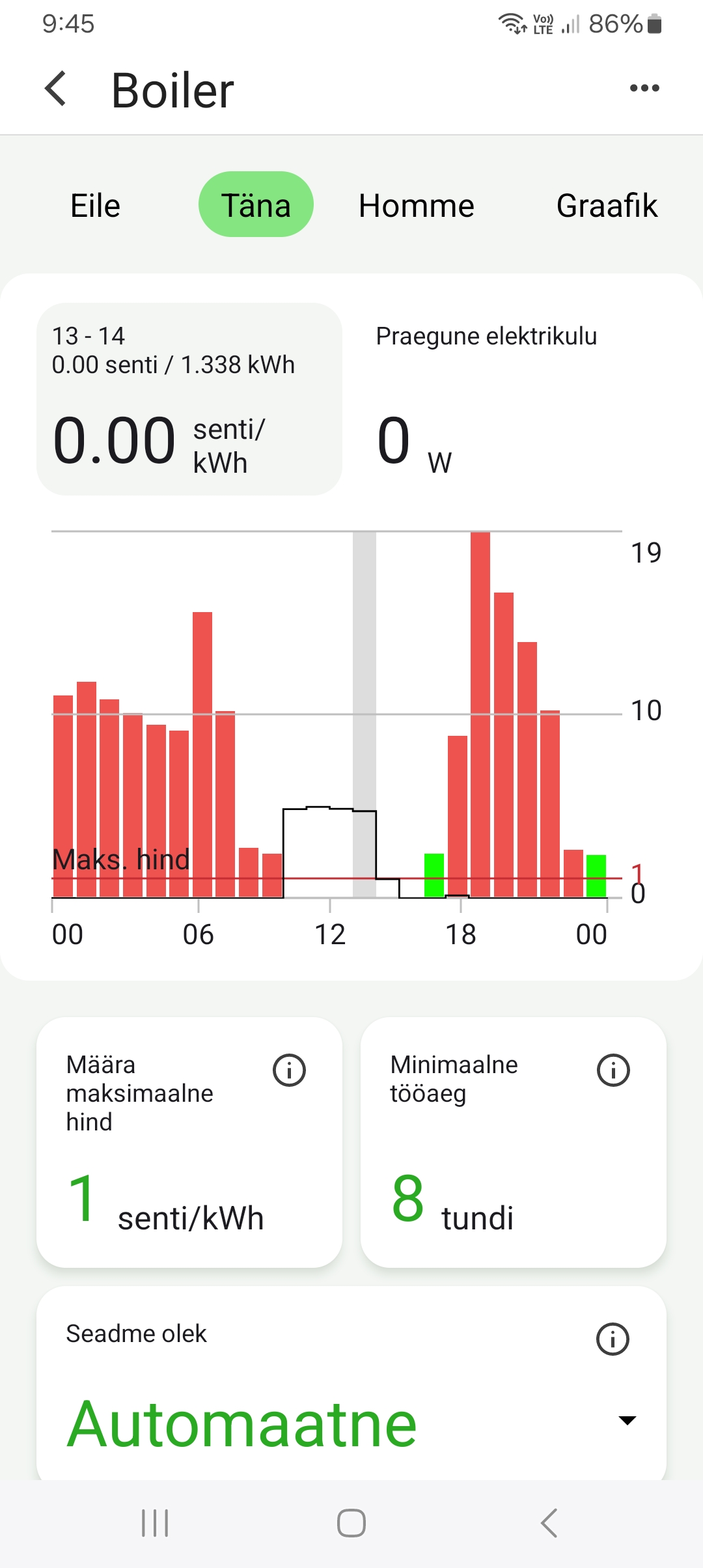
Set the maximum electricity price (cents/kWh) in the app, below which your device will operate. You can also configure critical hours when the device must always run.
Done! Start saving
The socket will automatically start tracking Nord Pool prices and turn your device on only during the cheapest hours. You can see the savings right away in the app.
Gruff app
The Gruff app is available for both Android and iOS. With the app you can:
- Track Nord Pool prices in real time
- Set price limits and working hours
- View energy consumption history
- Turn devices on/off remotely
- Receive notifications about price changes
Frequently asked questions
Does the socket work with a 5 GHz Wi-Fi network?
Is the app free?
How powerful of a device can be connected?
Is my data secure?
What happens if my internet goes down?
Can I use multiple sockets?
Ready to start saving?
Setup takes less than 5 minutes. Start optimizing your energy costs today.